Lesaka Online - Virtual#
This is a popular solution mainly due to the ease of integration into the solution and the high level of Security that it provides to merchants.
Introduction to Virtual#
The Virtual Payment Solution makes use of Lesaka Online’s hosted payment page. This is a popular solution mainly due to the ease of integration into the solution and the high level of Security that it provides to merchants.
The Virtual Solution also has the ability to be customized to such an extent that your client would feel as though they are on your website while making payment, ensuring peace-of-mind throughout the entire checkout process.
The Virtual solution offers the ability for a merchant to customise the logo, colours and details displayed on the payment page so that the cardholder does not feel that they are leaving the merchants website. The Virtual Payment Page is operating behind TLS (Transport Layer Security) security protocol and all information that is captured on the payment page is encrypted using 128-bit encryption ensuring that your client’s credit card details are kept safe.
Virtual Features#
- The merchant is not required to implement TLS, therefore saving costs.
- Both the merchants logo and details can be hosted on the payment page.
- CSS Editor allowing full payment page customization.
- Email confirmation can be sent to card holder for successful purchases.
- The Fraud Module can be configured to help reduce fraud.
- Failure and Success Pages can be configured to be displayed by Lesaka Online.
- Additional detail such as shipping address and purchase items can be displayed on the payment page
- This is a quick and easy method which ensures less programming.
- Basic development skills are required.
Virtual Payment Process#
One of the main benefits of utilising the Virtual Solution is the simplicity in which to integrate it into your online website. It requires less development work than other Lesaka Online Solutions and security measures are already incorporated by Lesaka Online.
Virtual allows the merchant to utilize the Lesaka Online payment webpage. This means that your clients will be directed to Lesaka Online’s Payment Page where they will enter their credit card details in order for the transaction to be completed. The payment information which Lesaka Online requires is posted to Lesaka Online via a form POST. This POST can be done in any language that supports this method.
Illustration: Virtual Payment Process
Step 1 Cardholder makes purchase from merchant’s website.
Step 2 Merchant creates form post to Virtual payment page.
Step 3 Lesaka Online processes the transaction to the merchant Bank.
Step 4 The merchant bank processes the transaction and returns a successful or declined message.
Step 5 Lesaka Online returns this result and/or error code with error description back to the Merchant
Website address specified in the form POST.
Step 6 If the functionality is set up (from the Lesaka Online Web Console) Lesaka Online will notify the card
holder via email of the transaction details and the merchant via email.
General Requirements for Using Virtual#
- Website You must have a website or shopping cart and have ability to load sample code or shopping cart code to the site.
- Internet Merchant Account You are required to have an internet merchant account with a bank.
- Internet Connectivity Internet connectivity is required to post the transaction.
- Internet Service Provider (ISP) An ISP is required to host your site.
- Lesaka Online issued Merchant ID and Application ID Required parameters when sending your form post.
Internet Merchant Account#
An Internet Merchant Account is required to accept credit card transactions over the internet. If you have an Internet Merchant Account you need to supply these details to Lesaka Online before going Live. If you do not have an Internet Merchant Account, Lesaka Online can assist you with your application to the acquirer (bank).
Note: An Internet Merchant Account is a different type of merchant account than what is used for card present / POS transactions. You will need to apply for an Internet Merchant Account even if you already accept credit card transactions from your store.
Security Server Passwords#
You need to apply security best business practice to ensure that confidential data and card detail are protected while either being stored in the database or while data is being transmitted. It is suggested that you encrypt key information issued to you by Lesaka Online. This will be things like your User Access, JWT Token Secret and access tokens.
Note: To reduce fraud or potential incidents it is recommended to encrypt any passwords that give access to your server.
TLS#
TLS (Transport Layer Security) is a security protocol that ensures that data being captured on Lesaka Online’s payment page cannot be read by encrypting the data using two encryption keys. The Virtual solution does not require a merchant to implement TLS protocol as this is handled by Lesaka Online.
Integration#
Form Post URL#
The form post URL is the Lesaka Online URL used to submit the form post to Lesaka Online provides the following URL for both Live and Test.
Test URL :
Production URL :
Testing#
For testing purposes, we have provided a MerchantUID and ApplicationUID’s in multiple currencies.
MerchantID: 9BA5008C-08EE-4286-A349-54AF91A621B0
JWT Secret: yglTxLCSMm7PEsfaMszAKf2LSRvM2qVW
3D Secure OTP/Password: Displayed on the ACS Page, otherwise try: ‘1234’ or ’test123’
When going live, these will need to be replaced in your code by using the Lesaka Online issued MerchantID and ApplicationID. You can retrieve your JWT Secret from the Merchant Portal.
Test Cards#
For comprehensive test card information including all card types, credentials, and usage instructions, please refer to our dedicated test cards resource page.
Quick Reference - Test Credentials:
- MerchantID:
9BA5008C-08EE-4286-A349-54AF91A621B0 - JWT Secret:
yglTxLCSMm7PEsfaMszAKf2LSRvM2qVW - 3D Secure OTP/Password: Displayed on the ACS Page, otherwise try:
1234ortest123
Go Live Checklist#
Overview#
Use the Go Live Check List to make sure that you have completed all necessary tasks before going live. Please ensure that the following criteria have been met:
Configuration#
Virtual Form Post have been embedded onto your website
Merchant Payment Page have been configured in Lesaka Online Portal
Merchant ID and Application ID of the Merchant (NOT test Merchant ID and Application ID) is being used in your message type.
Testing#
Test a Successful Transaction using our Virtual Test Cards
Test a Decline transaction using our Virtual Test Cards
Test transactions are visible in Lesaka Online Portal
Sandbox/ Staging Portal Credentials#
Username: guest@adumoonline.com
password: Guest!2345
Go Live#
Merchant received Go Live email from Lesaka Online. This email will contain the merchants Customer ID and Merchant ID .
(If not, have merchant contact support@adumoonline.com )Ensure that you are using the Live URL.
Perform Live transaction with Live card
Log into the Client Portal and to obtain the Production JWT Secret Key#
- Click Portal Admin on the left-hand menu
- Click Manage User Groups
- Click on the Edit button/action
- Enable -“View JWT Token
Thereafter you can view the JWT Secret Key#
- Navigate to the E-Commerce tab on the left-hand side
- Select the JWT And API Authentication page
- Select the relevant application from the Application Name dropdown menu
- Once selected, click Reveal to expose your Secret Key as plain text
Integration Support#
Merchants#
If you are a merchant that has signed up with Lesaka Online’s Virtual solution, you will have access to Lesaka Online’s Integration Help Desk for telephonic and email support. Telephonic support is available 8am to 5pm GMT +2. Email support is 8am to 5pm GMT + 2 and connects directly to our help desk through our ticketing system.
Developers#
If you are a developer that you will have access to Lesaka Online’s Integration Help Desk for email support. Email support is 8am to 5pm GMT + 2 and connects directly to our help desk through our ticketing system.
If you send an email you will immediately be emailed back a reference to track your integration query.
Email: support@adumoonline.com
JSON Web Token (JWT)#
What is JSON Web Token?
“JSON Web Token (JWT) is an open standard (RFC 7519) that defines a compact and self-contained way for securely transmitting information between parties as a JSON object. This information can be verified and trusted because it is digitally signed.”
You can read more here (https://jwt.io/introduction )
You must implement the JSON Web Token (JWT) in the request to us and validate the response token (_RESPONSE_TOKEN)
We strongly recommend the following validation on the response token:
Confirm the signature of the JWT token is valid
Confirm that the values in the JWT token match with the values for the order.
The values that must get validated are:
mref (Merchant Reference)
amount
auid (Application UID)
cuid (Merchant UID)
notificationURL - In addition to the above variables, the notificationURL can be used to sent a webhook per transaction in addition to the ones that is configured in the merchant portal. Refer to webhooks: Webhooks
Use the result field in the JWT token as your success and failed indicator
Warning: Failure to put the recommended JWT token validations in place could lead to financial losses.
Example JWT
{
"eyJhbGciOiJIUzI1NiIsInR5cCI6IkpXVCJ9.eyJtdWlkIjoiMzQ4OEJGNzItMDFFNi00REU1LUI2NjAtMUZFQTdGOUE0Q0NBIiwiY3VpZCI6IjM0ODhCRjcyLTAxRTYtNERFNS1CNjYwLTFGRUE3RjlBNENDQSIsImp0aSI6IjUyMjViZmQ1NDExMWFzZGNhM2EiLCJpYXQiOjE1NTI5MTMzOTgsImV4cCI6MTU1Mzk5OTc5OH0.d8uEgDew3SiUxpe-Kyp3NqZJgJo75FlRN5G3AXohk5Y"
}
Request Example
{
"iss": "Dev Center",
"cuid": "9BA5008C-08EE-4286-A349-54AF91A621B0",
"auid": "4196B0B8-DB88-42E5-A06D-294A5E4DED87",
"amount": "12.00",
"mref": "DEV_xUQ58CeG",
"jti": "QXiY24ZQvuPkwvU6KlDokWIgeX387MlX+M3qF8OrhRY=",
"iat": 1621936758,
"exp": 1621937358
"notificationURL":"https://webhooks.yourdomain.com/webhooks/response.php"
}
Decoded Response Example
{
"jti": "[B@51c83aae",
"iat": 1612528158,
"cuid": "BAAB2819-7286-49D3-8AD3-1212B3B40C2A",
"auid": "A50376D2-0CDF-46DF-BDDD-30F0B514D853",
"result": -1,
"transactionIndex": "5bb926df-68ed-4154-bf01-cd1e7f2278a5",
"mref": "DV_LNMnOi8bUn",
"amount": "0.02",
"mode": "1",
"tkn": "",
"puid": "e36bdd6e-c9c1-4aa6-a10d-8f0ce9b6d361",
"exp": 1612528758
}
JWT(Token field) can be programatically constructed as follows:
php Example using a standalone php library
require_once('jwt.php');

$SecretKey = 'NFeCMY17FoaDkLe3azMchsNbLOpgkO2Wh58'; //Supplied by Lesaka Online

$payloadArray = array();
$payloadArray['iss'] = $iss; //The identity of the party that issued the JWT. The claim holds a simple string, of which the value is at the discretion of the issuer
$payloadArray['cuid'] = $MerchantID;
$payloadArray['auid'] = $ApplicationID;
$payloadArray['amount'] = $amount;
$payloadArray['mref'] = $merchantReference;
$payloadArray['jti'] = base64_encode(random_bytes (32));
$payloadArray['iat'] = time() - 60;
$payloadArray['exp'] = time() + 600;
$payloadArray['notificationURL'] = 'https://developers.adumoonline.com/webhooks/response.php';

//$Token will be used to populate the Token form field in the POST to our payment page
$Token = JWT::encode($payloadArray, $SecretKey);

//The response token can be decoded as follows
$decodedData = JWT::decode($jwtToken, $SecretKey, array('HS256'));
You can find more code examples here (https://jwt.io/#libraries-io )
HTML Code#
If you have in depth HTML knowledge or web development skills you can create more variables. The below examples could be applied if you have a web application or shopping cart. The Below HTML example shows how your form POST could look when extensive information is getting sent to Lesaka Online:
Virtual Request and Response Format#
This section provides detailed documentation of the request and response parameters used in Virtual payment transactions. Understanding these parameters is essential for proper integration with the Lesaka Online Virtual payment system.
Virtual Request Layout#
The following table describes the request parameters that can be sent to the Virtual payment page:
| Data Element Name | Presence | Field Type & Format | Description | Example |
|---|---|---|---|---|
| MerchantID | M | GUID | Each merchant is issued a MerchantID from Lesaka Online. This will identify the merchant on Lesaka Online’s Back Office system. | F5785ECF-1EAE-40A0-9D37-93E2E8A4BAB3 |
| ApplicationID | M | GUID | Each merchant is issued with an ApplicationID by Lesaka Online. The ApplicationID is linked to your website or application. A merchant can have multiple ApplicationUIDs. The ApplicationID is linked to the MerchantID. | 1DBBBAAE-958E-4346-A27A-6BB5171CEEDC |
| MerchantReference | O | String (38) | The merchant can submit a reference per transaction. Typically, the Merchant Reference is an order number or invoice number. Only alphanumeric characters, spaces, underscores and hashes are allowed and must be UTF-8 encoded. | 19102015ordernum14 |
| Amount | M | Decimal (6.2) | This is the total value to be processed for authorization to the acquirer. | 150.00 |
| Token | M | String | This is the JWT token that is generated for the request. Mandatory fields for the token body: mref, amount, auid, cuid. | eyJhbGciOiJIUzI1NiIsInR5cCI6IkpXVCJ9… |
| AuthoriseCurrencyCode | C | String (3) | Currency collected from the card holder (ISO4217 3-character). Required if MCP is enabled. | USD |
| RedirectSuccessfulURL | M | String (255) | URL Lesaka Online redirects to on success. If empty, no redirect/update occurs. | http://www.yourwebsite.com/success.html |
| RedirectFailedURL | M | String (255) | URL Lesaka Online redirects to on failure. If empty, no redirect/update occurs. | http://www.yourwebsite.com/failed.html |
| OrderQty | O | String (255) | Total quantity of items purchased. Displayed on payment page. | 2 |
| OrderRef | O | String (255) | Links order to a reference number in your shopping cart. | Order number 1234 |
| OrderDescription | O | String (255) | Description of the order. | Books |
| OrderAmount | O | Decimal (6.2) | Total order amount in value terms. | 150 |
| OrderShippingCost | O | Decimal (6.2) | Total order shipping amount in value terms. | 15.00 |
| OrderDiscount | O | Decimal (6.2) | Total order discount amount in value terms. | 25.12 |
| Recipient | O | String (255) | Name of the individual who placed the order. | Joe Soap |
| ShippingAddress1 | O | String (255) | First line of the shipping address. | 14 Street Name |
| ShippingAddress2 | O | String (255) | Second line of the shipping address. | Somewheresville |
| ShippingAddress3 | O | String (255) | Third line of the shipping address. | Some Province |
| ShippingAddress4 | O | String (255) | Fourth line of the shipping address. | Somewhere Country |
| ShippingAddress5 | O | String (255) | Fifth line of the shipping address. | 8001 |
| ItemQty | O | N(9) | Total quantity of a particular item purchased. | 2 |
| ItemRef | O | String (255) | Reference for a particular item purchased. | 1285698 |
| ItemDescr | O | String (255) | Description of the item. | Books |
| ItemAmount | O | Decimal (6.2) | Total item amount in value terms. | 150.00 |
| ItemShippingCost | O | Decimal (6.2) | Item shipping amount in value terms. | 15.00 |
| ItemDiscount | O | Decimal (6.2) | Total item discount amount in value terms. | 25.12 |
| Variable | O | String (255) | Custom additional variables passed through. | INV454001 |
| UCI | O | String (128) | Adumo Fraud Module (BLS / UCI services). | Account123 |
| IPAddress | O | String (255) | Fraud Module (RSI, RFI, BLS, GIR). | 17.172.224.47 |
| ShippingCountryCode | O | String (2) | Two-letter ISO country code for shipping (Fraud Module). | UK |
| CountryCode | O | String (2) | Country where purchaser is. Used to determine payment options shown. | UK |
Virtual Response Layout#
The following table describes the response parameters that are returned from the Virtual payment page after a transaction is processed:
| Data Element Name | Presence | Field Type & Format | Description | Example |
|---|---|---|---|---|
| _RESULT | M | Bit | This is the result from the Authorization Request resulting in either a successful or failed transaction. 0 = successful -1 = failed 1 = successful with warning | 0 |
| _STATUS | M | String (255) | Transaction status indicating the final state of the transaction. | APPROVED, DECLINED, USER_CANCELLED |
| _MERCHANTREFERENCE | M | String (38) | Merchant reference submitted in the authorization request. | 19102015ordernum14 |
| _TRANSACTIONINDEX | M | GUID | Unique identifier created by Lesaka Online for a transaction (for tracking & reconciliation). | 7E4FEF88-DAC0-4CAE-B57A-129F3F369B07 |
| _ERROR_CODE | C | N(4) | Lesaka Online Error Code (if generated). | 1004 |
| _ERROR_SOURCE | C | String (255) | Process area where the transaction failed or was declined. | validate.card details |
| _ERROR_MESSAGE | C | String (255) | Brief message relating to the Response Code. | ApplicationUID is required |
| _ERROR_DETAIL | C | String (255) | Detailed description of the error message. | An invalid merchant UID was specified. |
| _BANK_ERROR_CODE | C | N(2) | Bank Error Code returned when a transaction is declined. | 21 |
| _BANK_ERROR_MESSAGE | C | String (255) | Message relating to the bank error code. | Insufficient funds |
| _3DSTATUS | C | N(1) | Electronic Commerce Indicator from the MPI. | 5 |
| _PANHASHED | C | String (16) | First six & last 4 digits of the card number (if requested). | 123456******1234 |
| _CARDCOUNTRY | C | String (255) | Country where the card was issued. | UK |
| VARIABLE1 | C | String (255) | Merchant variable returned (if specified). | INV454001 |
| _COUNTRYCODE | M | String (3) | Country code submitted in the Authorization Request. | UK |
| _CURRENCYCODE | M | String (3) | Authorization currency type. | USD |
| _AMOUNT | M | Decimal (6.2) | Total value processed. | 150.00 |
| _PAYMETHOD | M | String (255) | Payment method used. | ePay Virtual, SID, Mobicred, Visa Checkout |
| _ACQUIRERDATETIME | M | YYYY/MM/DD hh:mm:ss | Time and date stamp of the transaction. | 2007/05/15 11:42:10 AM |
| _RESPONSE_TOKEN | M | String | JWT response token containing transaction details. | eyJhbGciOiJIUzI1NiJ9.eyJqdGkiOiJbQkA1ZjJh… |
| _LOCALE | C | String (5) | Locale/language setting used. | en_ZA, en_US |
| TXTPRICE | C | Decimal (6.2) | Transaction price/amount processed. | 0.02 |
| VARIABLE1 | C | String (255) | First custom variable returned (if specified). | Testing123 |
| puid | C | GUID | Profile Unique Identifier (for tokenization & 1Click payments). | e36bdd6e-c9c1-4aa6-a10d-120e36bdd6e2 |
| uci | C | String (128) | Unique Client Identifier (if specified, used for fraud detection). | Account123 |
HTML Sample#
The below code can be copied into your code for testing purposes. Please note however, that before going live, you will need to change the details in the above example.
Raw Payload / Form Data
Virtual Payment Response (Raw)
Should you make use of an E-commerce platform, we have plugins/addons available for the following:#
- Woocommerce (Wordpress)
- Magento
- Shopify
- PrestaShop
- ZenCart
- OpenCart
- Odoo
Payment Methods#
Overview#
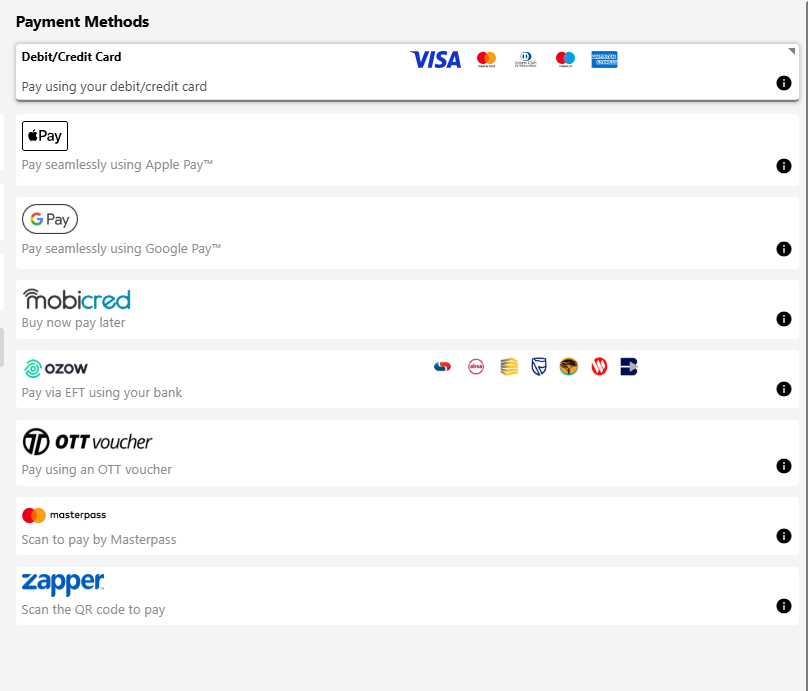
Merchants can use Virtual to integrate with any of Lesaka Online’s payment methods. The payment methods that Lesaka Online offer can be found at https://www.adumoonline.com/solutions
Examples of these payment methods are:
- Credit Card & Debit Card
- Visa Checkout
- Mobicred
- Ozow
- Multi-currency processing
- QR Code
- Apple Pay
- Google Pay
Payment Options Page#
Process Flow Description for Payment Page
- The merchant begins the process by posting a Request to Virtual.
- All the payment methods linked to the application ID used will display in the payment options menu.
- Virtual processes the transaction to the relevant financial service provider.
- Virtual replies immediately by posting back detailed response data. The detailed response will include the payment method that was used to pay.
- In some cases, the payment method chosen will be more suited to an asynchronous process. For instance, when the client is given payment instructions by Virtual and these instructions can take some time to complete. If/when Virtual receives a response from the financial service provider, then Virtual will post the response data back to the RedirectSuccessfulURL or RedirectFailedURL provided by the merchant in step 1.
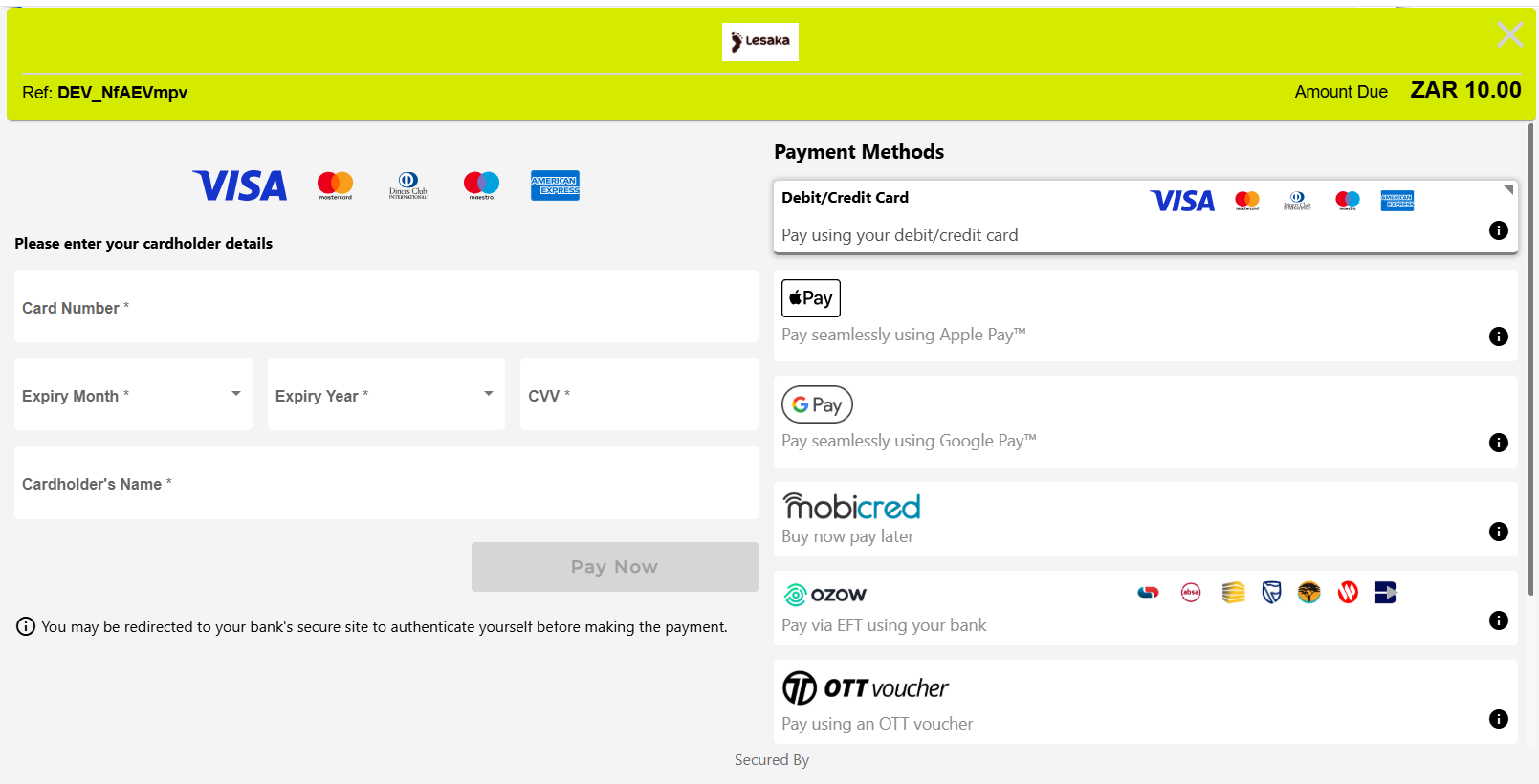
Example of Payment Options Page
Payment Option Page Customization
The payment options page is customizable (example: merchant logo) to maintain the look and feel of the merchant system as far as possible. This is done from within the Lesaka Online Web Console. Click here to see how to upload logo.
Virtual 1Click#
Introduction to 1Click#
1Click payments offers the card holder a simplified checkout experience. The solution caters for customers that repeatedly purchase goods or services from a merchants website by simplifying the checkout experience. The solution will tokenize the card holders details during the initial transaction. For subsequent transactions, the merchant can be configured to allow the cardholder to enter a CVV or not, to process the payment, making the checkout process more simplified. At any point, the card holder can amend card details, which will update the token with the new card information.
For the Virtual 1Click solution, it is possible to store multiple cards, allowing the user the ability to choose the tokenized card they wish to pay with.
1Click Payment Process#
One of the main benefits of utilising the 1Click - Virtual Solution is the simplicity in which to integrate it into your online website. It requires less development work than other Lesaka Online Solutions and security measures are already incorporated by Lesaka Online.
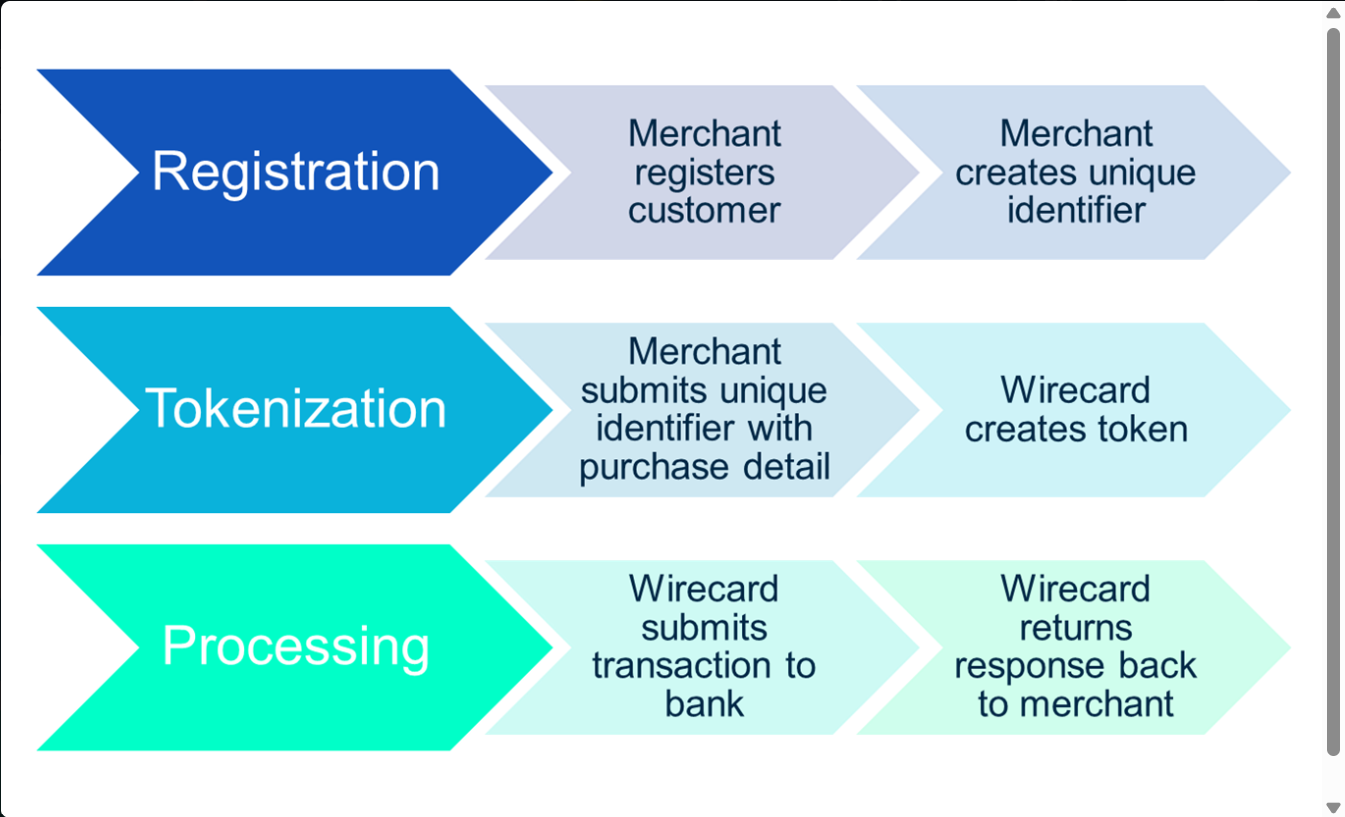
1Click Process Flow
1) Submit a form POST to the Virtual payment page and include an additional form field in your request
2) The payment page reads the puid field and does a lookup to see if the token has been registered before:
3) If card detail is not registered yet (Card holders first time making a payment):
- The card holder is required to enter full card details and select “Save and Pay Now”.
- Lesaka Online takes the card details with the token submitted in the form POST and registers the details in the Lesaka Online’s database.
- The transaction is then processed as normal to the bank.
- The transaction results are returned in the message response.
- The PUID is the Profile ID that all tokenized cards are associated with and is returned in the JWT .
4) If card holder is registered (Card holders second time making a payment):
- The payment page will display all previously registered cards for the cardholder, with pre-populated fields containing their card details (retrieved from the Lesaka Online database).
- The card holder is asked for their CVV if required by the merchant (last 3 digits on the back of the card).
- The card holder selects to “Pay Now” at which stage Lesaka Online processes the transaction and the card holder is debited.
- The results of the transaction are posted back to the website.
5) If card holder is registered and wants to modify their details:
- The payment page will display all previously registered cards for the card holder, with pre- populated fields containing their card details (retrieved from the Lesaka Online database).
- The card holder chooses a card and selects to “Edit”.
- The card holder is then asked for their updated card details.
- The card holder selects “Pay Now” where an update is done on their card details. This updates Lesaka Online’s database to the new card details the card holder entered.
- The transaction is processed to the bank.
- The results of the transaction are posted back to website.
6) If card holder is registered and the card has expired:
- The card holder is displayed a message informing them that their card has expired.
- The card holder is forced to update their card details and are prompted for updated card details.
- The card holder selects “Pay Now” and the card details are updated.
- The transaction is processed and the card holder is debited.
- The results of the transaction are posted back to website.
Ozow#
Make payments to, or request refunds from thousands of businesses online or in-store. With Ozow it’s easy, fast, secure and happens directly from your bank account.
Ozow Transaction Process
Step 1 - The customer selects Ozow as their payment option when shopping online.
Step 2 - The customer is prompted to select their bank
Step 3 - The customer would need to sign into their bank and select the account they want to pay from.
Step 4 - Accept the two-factor authentication request from your bank
Step 6 - Ozow returns the results of the payment to Lesaka Online
Step 7 - Lesaka Online returns these results to the merchant. The merchant can then display the results on the payment confirmation page
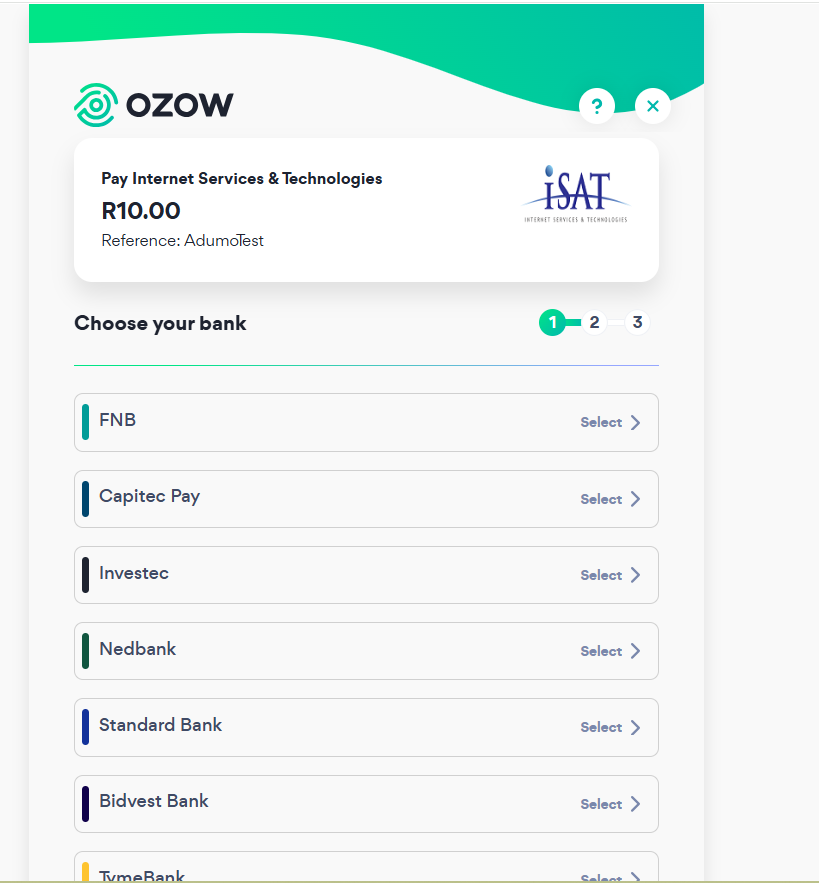
Example of Ozow Page