Lesaka Online - Enterprise#
Integration#
Preparation for Integration to Enterprise#
You can follow the below steps to prepare for integration to your website, shopping cart or application to the Enterprise solution:
- For Test Account information, click here .
- If you do not have a Live Account, please email our sales team.
- Configure referral IP within the Lesaka Online Web Console.
- Decide whether you are going use Real Time or Deferred Settlement Processing Methods.
Note: Association rules state that if selling physical goods a merchant should use deferred settlement. - Decide whether you are going to use 3D Secure to help reduce fraudulent credit card transactions.
Note: If you are going to integrate to 3D Secure refer to the 3D Secure Integration Guide.
Note: 3D Secure is a mandatory requirement for certain banks. - Decide whether you are going to store credit card detail in your database or use the Lesaka Online Web Console or one of Lesaka Online’s tokenization solutions to manage your transactions.
Note: Lesaka Online does NOT recommend card storage. Please refer to PCI Standards for association rules related to card storage. - Integrate your website or shopping cart using your code, Lesaka Online sample code or Lesaka Online shopping cart code. Ensure that you use the test URL when testing with test account details.
- Test Enterprise via the production URL before you go live with your site. Ensure that you are using the correct Merchant ID and Application ID issued to you on registration.
Registering for a Live Account#
In order to register for a live account, you will need an internet merchant account and sign up for Lesaka Online’s payment gateway services.
Test Account Details#
For testing purposes, we have provided a MerchantUID and ApplicationUIDs.
Note: If your merchant account is 3DS enabled, please ensure that you have integrated into the 3DS Lookup and Authenticate methods (Actions 14 and 15).
3D Secure OTP/Password: Displayed on the ACS Page, otherwise try: ‘1234’ or ’test123’
MerchantUID: 9BA5008C-08EE-4286-A349-54AF91A621B0
When going live, these will need to be replaced in your code by using the Lesaka Online issued MerchantUID and ApplicationUID.
Go Live Checklist#
Overview#
Use the Go Live Check List to make sure that you have completed all necessary tasks before going live. Please ensure that the following criteria have been met:
Configuration#
- Is your merchant account enrolled for 3D Secure or does your bank have mandatory requirements for 3D Secure? If so, have you completed 3D Secure Integration as the 3D Secure Transaction Index will be required in the Enterprise API message.
- Authorise and Capture Integration Completed
- Merchant ID and Application ID of the “Merchant” (not test Merchant ID and Application ID) is being used in your message type.
Testing#
Test 3D Secure Lookup and Authenticate
Test Authorise and Settle
Test transactions are visible in Lesaka Online Web Console
Go Live#
Merchant received Go Live email from Lesaka Online. This email will contain the merchants Customer ID and Merchant ID .
(If not, have merchant contact support@adumoonline.com )Ensure that you are using the Live URL.
Perform Live transaction with Live card
Test Cards#
For comprehensive test card information including all card types, credentials, and usage instructions, please refer to our dedicated test cards resource page.
Quick Reference - Test Credentials:
- MerchantID:
9BA5008C-08EE-4286-A349-54AF91A621B0 - JWT Secret:
yglTxLCSMm7PEsfaMszAKf2LSRvM2qVW - 3D Secure OTP/Password: Displayed on the ACS Page, otherwise try:
1234ortest123
Enterprise API#
Introduction#
The purpose of this document is to explain in detail the information and steps necessary to integrate to the Lesaka Online API in order to process card transactions.
The following section, Process Flow Diagram, shows the higher level flow of what steps are necessary to process a transaction. Detailed explanations of each step are then given in the order in which they are presented in the diagram.
During the onboarding process, the option is available to enable auto settlement of transactions, as explained in the Process Flow Diagram section and mentioned in the 3DS Secure - Authorise section.
This is a PCI compliant payment solution, therefore PCI compliance is needed to integrate using this method, as card details will be entered and submitted.
The URLs provided for the various API calls are from the QA testing environment.
There is a Postman Collection available which interacts with the Lesaka Online QA environment which can be used as a guide for integration.
URL to postman collection: Postman_Collection.zip
Process Flow Diagram#
As mentioned above, the following diagram shows the high level flow of the steps required to process a transaction:
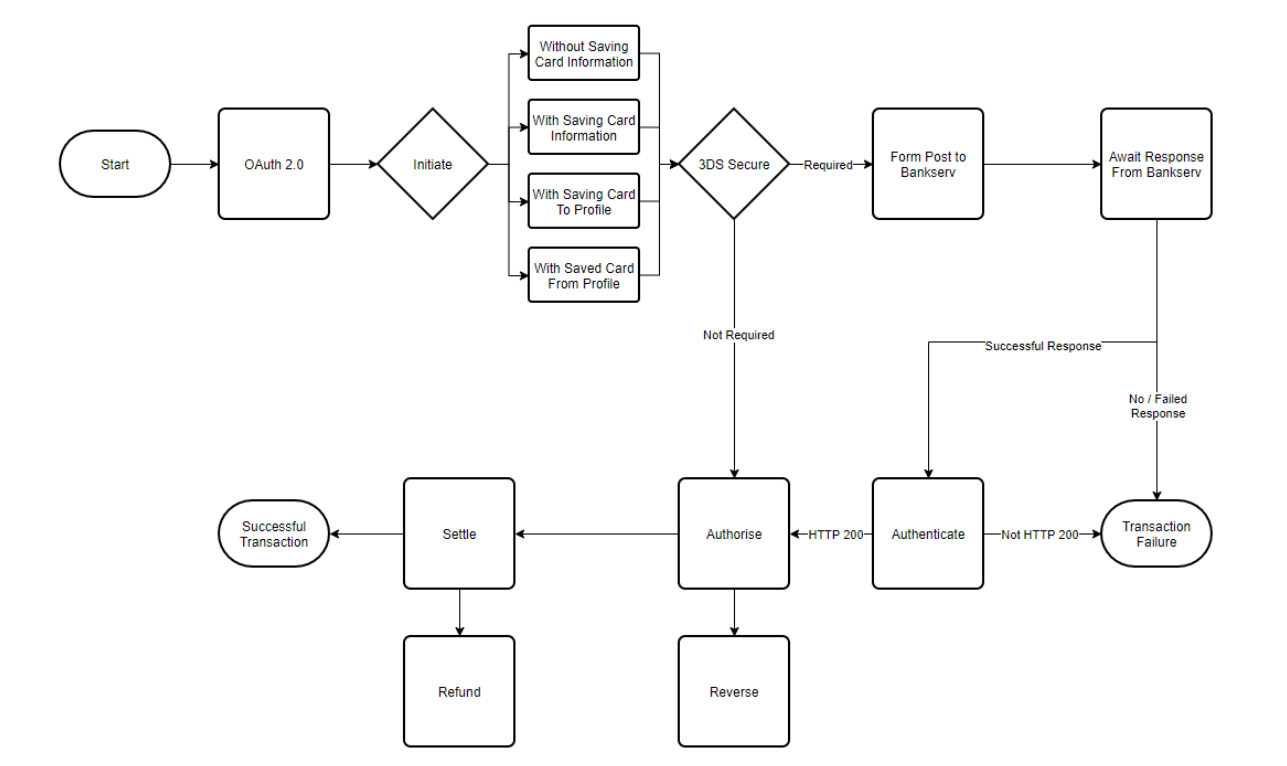
To give a brief description of the process flow:
First, a call to the OAuth service needs to be made, to acquire the bearer token which must be included in all subsequent calls. PLEASE NOTE: If the token expires, another call must be made to retrieve a new token before more calls can successfully be made. More information is available in the OAuth 2.0 section.
Next the transaction is Initiated, with four possible options for card information related to the transaction.
Initiate without saving card information - The card information is sent in order to initiate the transaction, however it is not saved for use again later by the same user.
Initiate with saving card information - The card information sent is saved to a new user profile which is created for the user.
Initiate with saving card to profile - The card information sent is saved to an existing profile, where the user then has multiple stored cards.
Initiate with saved card details from profile - Card information is not sent, simply a reference to the card saved in the user profile which will be used to initiate the transaction.
For each transaction, a check is done to determine whether 3DSecure is necessary for the transaction. If so, there are some extra steps to follow. If not, the transaction can be authorised.
If 3DSecure is required for the transaction, an HTTP POST needs to be sent to Bankserv. The TermURL provided in that POST gives Bankserv a way to send an HTTP POST back, which needs to be exposed. That response is required before the transaction can continue, or else it is timed out.
Upon Bankserv responding, the transaction can then be authenticated. This call verifies that the response from Bankserv was received and successful, or else the transaction is failed.
After a successful authentication the transaction can then be authorised.
While in an authorised state transactions may be reversed if required.
The transaction can then be settled, and has successfully been completed.
While in a settled state, transactions may be refunded if required.
Independently of any payment, funds can be paid out to a cardholder with a Credit (OCT Payout). A credit is a standalone transaction against a verified card token, and is not linked to a previous payment. See the Credit (OCT Payout) section.
More detailed information is given in the rest of the document.
OAuth 2.0#
The OAuth service provides authorization for subsequent API calls.
URL for the Call:#
[POST]
Production URL: https://apiv3.adumoonline.com/oauth/token?grant_type={{grant_type}}&client_id={{client_id}}&client_secret={{client_secret}}
The call itself requires three query parameters, which Lesaka Online will provide:
- grant_type
- client_id
- client_secret
Example Call:
[POST]
https://staging-apiv3.adumoonline.com/oauth/token?grant
_type=client_credentials&client_id=9BA5008C-08EE-4286-A349-54AF91A621B0&client_secret=23adadc0-da2d-4dac-a128-4845a5d71293
Sample Output:
{
  "access_token": "{ your access token }",
  "token_type": "bearer",
  "expires_in": <seconds>,
  "scope": "read",
  "jti": "{ your jti }"
}
Sample Output Details:
| Field | Description | Type |
|---|---|---|
| access_token | Token required as a bearer token for subsequent | string |
| token_type | Defaults to bearer | string |
| expires_in | Lifespan of token validity in seconds | integer |
| scope | Defaults to read | string |
| jti | According to OAuth 2.0 spec | string |
List of Message Types#
The below table represents the message body message types that the API supports and indicates the entity that originates the message type.
| Message Type | Comments |
|---|---|
| Initiate Transaction | The initiate transaction call is used to create the transaction. |
| 3DS Authenticate | This message is used direct the card holder to their banks authentication page where they will validate the transaction using their secret password. |
| Authorise | The Authorise message creates a request to hold the requested amount and mark it as unavailable from the customer’s card until it is either Captured or the hold terminates, thus rendering the amount available again. |
| Reverse | The Authorise — Reversal Message releases the hold that the Authorize placed on the customer’s credit card funds. Use this service to reverse an unnecessary or undesired Authorisation. You can use full Authorise — Reversal only for an authorisation that has not been captured. |
| Settle | When you are ready to fulfil a customer’s order, Settle the Authorisation for that order. |
| Refund | Refund messages are generated when a merchant wants to return the funds after a transaction that has been settled. |
| Credit (OCT Payout) | The Credit message pays an amount out to a cardholder’s card as a standalone Original Credit Transaction (OCT). It is not linked to a previous payment and the amount is not bound to one. The card is identified by a verified card token only. |
API Explorer and Sample Code#
Initiate Transaction#
The initiate transaction call is used to create the transaction, and based on the input can be one of four options, the details of which are listed below.
URL for the Call:
[POST]
Test URL: https://staging-apiv3.adumoonline.com/products/payments/v1/card/initiate
Production URL: https://apiv3.adumoonline.com/products/payments/v1/card/initiate
Initiate Without Saving Card Information#
Sample Input:
  {
     "merchantUid": "{ your merchant UID }",
      "applicationUid": "{ your application UID }",
      "budgetPeriod": 0,
      "cvv": "123"
      "cardHolderFullName": "{ your customer full name }",
      "cardNumber": "{ customer card number }",
      "expiryMonth": { from 1 to 12 },
      "expiryYear": { valid year in the future },
      "merchantReference": "{ your order number to uniquely idetify the transaction}",
      "value": { transaction amount to two decimal points eg. 15.25 },
      "ipAddress": "{ IP Address of the user's browser or merchant server  }",
      "userAgent": "{ browser header }",
      "saveCardDetails": false,
      "uci": "{ unique client identifier }"
  }
Sample Input Details:
| Field | Description | Type | Required |
|---|---|---|---|
| merchantUid | Your Merchant UID provided by Lesaka Online | String | Required |
| applicationUid | Your Application UID provided by Lesaka Online | String | Required |
| budgetPeriod | Selected budget period | Integer | Optional |
| cvv | Card CVV number. Required if not available in card authorization | String | Conditional |
| cardHolderFullName | Full names of the card holder | String | Optional |
| cardNumber | User’s card number | String | Optional |
| expiryMonth | Card expiry month | Integer | Optional |
| expiryYear | Card expiry year | Integer | Optional |
| merchantReference | Merchant provided identifying reference for order (eg. order number) | String | Required |
| value | Transaction value to two decimal places | Float | Required |
| ipAddress | IP Address of user’s browser or merchant’s server | String | Required |
| userAgent | Browser header | String | Required |
| saveCardDetails | Save card details or not | Boolean | Optional |
| uci | Unique Client Identifier, a way to uniquely identify customers | String | Optional |
Initiate With Saving Card Information#
Sample Input:
  {
      "merchantUid": "{ your merchant UID }",
      "applicationUid": "{ your application UID }",
      "value": { transaction amount to two decimal points eg. 15.25 },
      "budgetPeriod": 0,
      "cvv": "123"
      "merchantReference": "{ your order number to uniquely idetify the transaction}",
      "cardNumber": "{ customer card number }",
      "expiryMonth": { from 1 to 12 },
      "expiryYear": { valid year in the future },
      "cardHolderFullName": "{ your customer full name }",
      "ipAddress": "{ IP Address of the user's browser or merchants server  }",
      "userAgent": "{ browser header }",
      "saveCardDetails": true
  }
Sample Input Details:
| Field | Description | Type | Required |
|---|---|---|---|
| merchantUid | Your Merchant UID provided by Lesaka Online | String | Required |
| applicationUid | Your Application UID provided by Lesaka Online | String | Required |
| budgetPeriod | Selected budget period | Integer | Optional |
| cvv | Card CVV number. Required if not available in card authorization | String | Conditional |
| cardHolderFullName | Full names of the card holder | String | Optional |
| cardNumber | User’s card number | String | Optional |
| expiryMonth | Card expiry month | Integer | Optional |
| expiryYear | Card expiry year | Integer | Optional |
| merchantReference | Merchant provided identifying reference for order (eg. order number) | String | Required |
| value | Transaction value to two decimal places | Float | Required |
| ipAddress | IP Address of user’s browser or merchant’s server | String | Required |
| userAgent | Browser header | String | Required |
| saveCardDetails | Save card details or not | Boolean | Optional |
| uci | Unique Client Identifier, a way to uniquely identify customers | String | Optional |
Initiate With Saving Card to Profile#
Sample Input:
  {
      "merchantUid": "{ your merchant UID }",
      "applicationUid": "{ your application UID }",
      "value": { transaction amount to two decimal points eg. 15.25 },
      "budgetPeriod": 0,
      "cvv": "123",
      "merchantReference": "{ your order number to uniquely idetify the transaction}",
      "cardNumber": "{ customer card number }",
      "expiryMonth": { from 1 to 12 },
      "expiryYear": { valid year in the future },
      "cardHolderFullName": "{ your customer full name }",
      "ipAddress": "{ IP Address of the user's browser or merchants server  }",
      "userAgent": "{ browser header }",
      "saveCardDetails": true,
      "profileUid": "{ user's card profile UID }"
  }
Sample Input Details:
| Field | Description | Type | Required |
|---|---|---|---|
| merchantUid | Your Merchant UID provided by Lesaka Online | String | Required |
| applicationUid | Your Application UID provided by Lesaka Online | String | Required |
| budgetPeriod | Selected budget period | Integer | Optional |
| cvv | Card CVV number. Required if not available in card authorization | String | Conditional |
| cardHolderFullName | Full names of the card holder | String | Optional |
| cardNumber | User’s card number | String | Optional |
| expiryMonth | Card expiry month | Integer | Optional |
| expiryYear | Card expiry year | Integer | Optional |
| merchantReference | Merchant provided identifying reference for order (eg. order number) | String | Required |
| value | Transaction value to two decimal places | Float | Required |
| ipAddress | IP Address of user’s browser or merchant’s server | String | Required |
| userAgent | Browser header | String | Required |
| saveCardDetails | Save card details or not | Boolean | Optional |
| uci | Unique Client Identifier, a way to uniquely identify customers | String | Optional |
| profileUid | UID of the client’s profile for stored card information | String | Optional |
| authCallbackUrl | Not currently in use | String | Optional |
Initiate With Saved Card Details From Profile#
Sample Input:
  {
    "merchantUid": "{ your merchant UID }",
    "applicationUid": "{ your application UID }",
    "value": { transaction amount to two decimal points eg. 15.25 },
    "budgetPeriod": 10,
    "cvv": "123",
    "merchantReference": "{ your order number to uniquely idetify the transaction}",
    "token": "{ user's card token }",
    "ipAddress": "{ IP Address of the user's browser or merchant server  }",
    "userAgent": "{ browser header }",
  }
Sample Input Details:
| Field | Description | Type | Required |
|---|---|---|---|
| merchantUid | Your Merchant UID provided by Lesaka Online | String | Required |
| applicationUid | Your Application UID provided by Lesaka Online | String | Required |
| budgetPeriod | Selected budget period | Integer | Optional |
| cvv | Card CVV number. Required if not provided in Initiate | String | Conditional |
| token | User’s card token from their profile | String | Optional |
| merchantReference | Merchant provided identifying reference for order (eg. order number) | String | Required |
| value | Transaction value to two decimal places | Float | Required |
| ipAddress | IP Address of user’s browser or merchant’s server | String | Required |
| userAgent | Browser header | String | Required |
Response#
PLEASE NOTE:
If the threeDSecureAuthRequired field in the below mentioned output is false, the remaining fields will be empty, indicating that no 3DS authentication is required and the transaction can simply be authorised.
If the threeDSecureAuthRequired field is true however, then 3DS authentication is required as described in the 3DS Secure section.
Sample Response:
  {
      "transactionId": "{ UID of transaction }",
      "threeDSecureAuthRequired": { true or false },
      "threeDSecureProvider": "{ provider for 3DS }",
      "acsUrl": "{ acsUrl to Bankserv }",
      "acsPayload": "{  Bankserv generated }",
      "acsMD": "{ Bankserv generated }",
      "profileUid": "{ returned if profile was created }"
  }
Sample Response Details:
| Field | Description | Type |
|---|---|---|
| transactionId | UID of transaction | String |
| threeDSecureAuthRequired | 3DSecure required for transaction or not | Boolean |
| threeDSecureProvider | Provider of 3DSecure | String |
| acsUrl | URL for POST to Bankserv | String |
| acsPayload | Generated by Bankserv | String |
| acsMD | Generated by Bankserv | String |
| profileUid | UID for created user profile | String |
The acsUrl, acsPayload and acsMD fields are required for the call to Bankserv mentioned in the following section.
3D Secure#
Form Post to Bankserve#
As mentioned in the previous section, for this form post the acsUrl, acsPayload and acsMD fields are required, as well as a TermUrl field.
The acsUrl is the URL to which the POST should be sent (form action), with the three fields in the POST being:
| Field | Description |
|---|---|
| MD | acsMD returned from Initiate |
| PaReq | acsPayload returned from Initiate |
| TermUrl | Your own exposed URL to which Bankserv POSTs a response to |
The authenticate call can be made after a response has been received on the TermUrl.
PLEASE NOTE: Lesaka Online will time out a transaction if it is not completed within 5 minutes of being initiated, therefore if no response is received from Bankserv the transaction will be timed out.
3D Secure Transactional Process#
The 3D Secure process consists of a web service call followed by a form post. Each call can bring back variable results that will form part of the next process.
High Level 3D Secure Transaction Process:
Step 1 - Shopper browses at merchant site, adds items to shopping cart, then finalizes purchase.
Step 2 - The merchant will invoke a web service (3DS Lookup) to the Lesaka Online’s API.
Step 3 - Lesaka Online sends query including card number to Directory Server. This leg of the process is also commonly known as VERes.
Step 4 - If card number is in a participating card range, Directory Server queries appropriate Access Control Server (ACS) to determine whether card number is enrolled.
Step 5 - ACS responds to Directory Server, indicating whether authentication is available for the card number.
Step 6 - Directory Server forwards ACS response (or its own) to Lesaka Online.
Step 7 - Lesaka Online’s will return a 3DS Lookup Response to the merchant. If cardholder is not enrolled in 3D Secure or if authentication is otherwise unavailable, the merchant submits a traditional authorization request and the 3D process ends.
Step 8 - Based on the result (issuer or card type participating), merchant initiates a form post (3DS Authenticate) that posts the values retrieved from the 3DS Lookup Response (first web service call) to the Access Control Server (ACS) via the shopper’s browser.
Step 9 - ACS authenticates shopper as appropriate for the card number then formats the ACS Result message with appropriate values and digitally signs it.
Step 10a - ACS returns an ACS result (PARes) to merchant via shopper’s browser.
Step 10b - ACS sends a copy of the Payer Authentication Response to the Authentication History Server.
Step 11 — Merchant process the result with authorization request to Lesaka Online.
Sample ACS Form POST#
  <form name="frmLaunchACS" method="POST" action="">
      <textarea cols="50" rows="5" style="width:400" name="PaReq" >
      </textarea><input type="text" style="width:400" name="TermUrl"/>
      /*This is the merchant URL that the form POST returns to -->      	value="http://www.merchant.com/3DSecure_Enterprise_Complete.php?Step=2"*/
      <input type="text" style="width:400" name="MD" value=""/>
      <input type="submit" value="Submit Form" style="width:250" >
  </form>
This Form POST will return TransactionIndex and paresPayload values once the cardholder has correctly entered their OTP. These values will be entered into the Authorise or Sale actions (Actions 1 or 5).
Illustration: OTP Page
Understanding Electronic Commerce Indicators (ECI)#
The ECI indicates the security level associated with an Internet purchase transaction. The 3DS Lookup & 3DS Authenticate requests will return an ECI in the response message which the merchant can use to gauge risk associated with the transaction. The payment gateway will process the ECI to the acquirer or its processor for inclusion in the authorization request message.
Note: Some ECI indicators will allow liability shift for certain transactions relating to chargebacks.
Note: Merchants can request that Lesaka Online block specific ECI’s that do not allow for liability shift.
Dispute evidence#
Merchants are recommended to store the below data as evidence in the event of a chargeback dispute relating to 3D Secure processing. The below data is returned on the 3DS Lookup & Authenticate responses.
| Dispute Situation | ECI | Evidence |
|---|---|---|
| Proof of Authentication or Authentication Attempt | 5,6,1 or 2 | Minimum, if available: |
| • Purchase Date and Time | ||
| • XID | ||
| • Purchase Amount | ||
| • Order Description | ||
| • Transaction Status | ||
| • ECI | ||
| • Signature Date & Time | ||
| • CAVV / AAV |
3D Secure Calls#
The merchant will be required to initiate three 3D Secure calls as defined below:
3DS Lookup: This message is used to verify if the issuer and cardholder participates in 3D Secure program.
3DS Authenticate: This message is used to direct the card holder to their banks authentication page where they will validate the transaction using their secret password.
Time Outs#
3DS Lookup
The standard timeout value for the 3DS Lookup to complete is ten seconds.
3DS Authenticate
The 3DS Authenticate Request message has no timeout value as it relies on the merchant’s eCommerce application to determine maximum time frames for various shopping session activities.
Authenticate#
The purpose of the authenticate call is to retrieve 3D Secure status and data associated with the transaction. This step is optional and can be skipped
URL for the Call:
[POST]
Test URL: https://staging-apiv3.adumoonline.com/product/authentication/v2/tds/authenticate/{{transactionId}}
Production URL: https://apiv3.adumoonline.com/product/authentication/v2/tds/authenticate/{{transactionId}}
Sample Output:
  {
    "transactionId": "48a94027-49bd-46f3-a761-7741a86ee944",
    "authorizationAllow": "Y",
    "statusCode": "TDS_AUTHENTICATED",
    "mdStatus": "1",
    "statusMessage": "Y-status/Challenge authentication via ACS: https://acsabsatest.bankserv.co.za/mdpayacs-1/creq",
    "eciFlag": "05",
    "enrolledStatus": "Y",
    "paresStatus": "Y",
    "paresVerified": "Y",
    "syntaxVerified": "Y",
    "dsId": "941880ba-e945-4373-b066-b7766c3ac9f8",
    "acsId": "eb3079e1-4e76-48ec-8366-a63e761541e7",
    "acsReference": "00001ACS00001",
    "cavv": "AAEBAiFXNwAAABRQcQEjdYSCkYQ=",
    "cavvAlgorithm": null,
    "tdsProtocol": "3DS2.2.0",
    "tdsApiVersion": "4.0",
    "cardType": "1",
    "authenticationTime": "2024-05-02 10:43:00",
    "authenticationType": "01",
    "xid": "MDAwMDE0MDA0OVUwdjhnRXFOWnM="
  }
Output from the authenticate call will either be an HTTP 200 response meaning the transaction may continue, or HTTP 500 meaning Bankserv was unable to authenticate the transaction.
Authorise#
The purpose of the authorise call is to authorise funds on the user’s card.
URL for the Call:
[POST]
Test URL: https://staging-apiv3.adumoonline.com/products/payments/v1/card/authorise
Production URL: https://apiv3.adumoonline.com/products/payments/v1/card/authorise
Sample Input:
  {
    "transactionId": "{ transaction ID from initiate response }",
    "amount": { authorise amount }
  }
Sample Input Details:
| Field | Description | Type | Required |
|---|---|---|---|
| transactionId | Id for the transaction to be authorised | String | Required |
| amount | Amount for the transaction to be authorised | Float | Optional |
Sample Output:
  {
    "statusCode": { 200 means success },
    "statusMessage": "{ message from bank }",
    "autoSettle": { indicates if the transaction was automatically settled or not },
    "authorisedAmount": { should match the amount sent in, same as what is sent to bank },
    "cardCountry": "{ issuing country for user's card }",
    "currencyCode": "{ code representing currency used in transaction }",
    "eciFlag": "{ Bankserv ECI flag}",
    "authorisationCode": "{ bank authorisation code }",
    "processorResponse": "{ bank processor response }"
  }
Sample Output Details:
| Field | Description | Type |
|---|---|---|
| statusCode | From user’s bank | Integer |
| statusMessage | From user’s bank | String |
| autoSettle | Indicate whether transaction was auto settled or not on bank side | Boolean |
| authorisedAmount | Amount sent in to be authorised | Float |
| cardCountry | Country of Card Used | String |
| currencyCode | Code for currency used in transaction | String |
| eciFlag | Bankserv ECI flag | String |
| authorisationCode | Bank authorisation code | String |
| processorResponse | Bank processor response | String |
Reverse#
The purpose of the reverse call is to reverse authorisation of a transaction.
URL for the Call:
[POST]
Test URL: https://staging-apiv3.adumoonline.com/products/payments/v1/card/reverse
Production URL: https://apiv3.adumoonline.com/products/payments/v1/card/reverse
Sample Input:
  {
    "transactionId": "{ UID of transaction to be reversed }"
  }
Sample Input Details:
| Field | Description | Type | Required |
|---|---|---|---|
| transactionId | UID for the transaction to be reversed | String | Required |
Sample Output:
    {
      "statusCode": { 200 means success },
      "statusMessage": "{ message from bank }",
      "autoSettle": { indicates if the transaction was automatically settled or not },
      "authorisedAmount": { should match the amount sent in, same as what is sent to bank },
      "cardCountry": "{ issuing country for user's card }",
      "currencyCode": "{ code representing currency used in transaction }",
      "eciFlag": "{ Bankserv ECI flag}",
      "authorisationCode": "{ bank authorisation code }",
      "processorResponse": "{ bank processor response }"
    }
Sample Output Details:
| Field | Description | Type |
|---|---|---|
| statusCode | From user’s bank | Integer |
| statusMessage | From user’s bank | String |
| autoSettle | Indicate whether transaction was auto settled or not on bank side | Boolean |
| authorisedAmount | Amount sent in to be authorised | Float |
| cardCountry | Country of Card Used | String |
| currencyCode | Code for currency used in transaction | String |
| eciFlag | Bankserv ECI flag | String |
| authorisationCode | Bank authorisation code | String |
| processorResponse | Bank processor response | String |
Settle#
The purpose of the settle call is to settle the authorised amount to the merchant’s account.
URL for the Call:
[POST]
Test URL: https://staging-apiv3.adumoonline.com/products/payments/v1/card/settle
Production URL: https://apiv3.adumoonline.com/products/payments/v1/card/settle
Sample Input:
  {
    "transactionId": "{ UID of transaction to be settled }",
    "amount": { amount to be settled }
  }
Sample Input Details:
| Field | Description | Type | Required |
|---|---|---|---|
| transactionId | Id for the transaction to be settled | String | Required |
| amount | Amount for the transaction to be settled | Float | Required |
Sample Output:
  {
    "statusCode": { 200 means success },
    "statusMessage": "{ message from bank }",
    "autoSettle": { indicates if the transaction was automatically settled or not },
    "authorisedAmount": { should match the amount sent in, same as what is sent to bank },
    "cardCountry": "{ issuing country for user's card }",
    "currencyCode": "{ code representing currency used in transaction }",
    "eciFlag": "{ Bankserv ECI flag}",
    "authorisationCode": "{ bank authorisation code }",
    "processorResponse": "{ bank processor response }"
  }
Sample Output Details:
| Field | Description | Type |
|---|---|---|
| statusCode | From user’s bank | Integer |
| statusMessage | From user’s bank | String |
| autoSettle | Indicate whether transaction was auto settled or not on bank side | Boolean |
| authorisedAmount | Amount sent in to be authorised | Float |
| cardCountry | Country of Card Used | String |
| currencyCode | Code for currency used in transaction | String |
| eciFlag | Bankserv ECI flag | String |
| authorisationCode | Bank authorisation code | String |
| processorResponse | Bank processor response | String |
Refund#
The purpose of the refund call is to refund a settled transaction.
URL for the Call:
[POST]
Test URL: https://staging-apiv3.adumoonline.com/products/payments/v1/card/refund
Production URL: https://apiv3.adumoonline.com/products/payments/v1/card/refund
Sample Input:
  {
    "transactionId": "{ UID of transaction to be refunded }",
    "amount": { amount to be refunded}
  }
Sample Input Details:
| Field | Description | Type | Required |
|---|---|---|---|
| transactionId | Id for the transaction to be refunded | String | Required |
| amount | Amount for the transaction to be refunded | Float | Required |
Sample Output:
  {
    "statusCode": { 200 means success },
    "statusMessage": "{ message from bank }",
    "autoSettle": { indicates if the transaction was automatically settled or not },
    "authorisedAmount": { should match the amount sent in, same as what is sent to bank },
    "cardCountry": "{ issuing country for user's card }",
    "currencyCode": "{ code representing currency used in transaction }",
    "eciFlag": "{ Bankserv ECI flag}",
    "authorisationCode": "{ bank authorisation code }",
    "processorResponse": "{ bank processor response }"
  }
Sample Output Details:
| Field | Description | Type |
|---|---|---|
| statusCode | From user’s bank | Integer |
| statusMessage | From user’s bank | String |
| autoSettle | Indicate whether transaction was auto settled or not on bank side | Boolean |
| authorisedAmount | Amount sent in to be authorised | Float |
| cardCountry | Country of Card Used | String |
| currencyCode | Code for currency used in transaction | String |
| eciFlag | Bankserv ECI flag | String |
| authorisationCode | Bank authorisation code | String |
| processorResponse | Bank processor response | String |
Credit (OCT Payout)#
The purpose of the credit call is to pay an amount out to a cardholder’s card. This is an Original Credit Transaction (OCT): a standalone transaction that pushes funds to the card, for example for competition winnings, insurance claims, gig-economy earnings or customer compensation.
A credit differs from a refund in three ways:
- It is not linked to a previous transaction. No
transactionIdis sent in; the credit creates a new transaction of its own. - The amount is not bound to a previous payment. Any amount greater than zero may be credited.
- The card is identified by a verified card token only. Card numbers are not accepted on this call.
Permission required: the OAuth client used for the call must have the CREDIT_CARD_TRANSACTION permission. Please contact support
to have it enabled on your account.
How a credit is processed:
- The request is validated and the token is looked up. An unverified token is rejected here, before a transaction is created.
- A transaction is created and passes the same rate-limit and fraud checks as a payment.
- A credit authorisation is obtained from the acquiring bank. If the bank declines it, the credit is not sent and the transaction ends in the
CREDIT_DECLINEDstate. - The credit itself is sent to the acquiring bank against that authorisation. On approval the funds are pushed to the card and the transaction ends in the
CREDITEDstate.
There is no 3D Secure step and no settlement step. A credit cannot be reversed or refunded once it has been approved.
URL for the Call:
[POST]
Test URL: https://staging-apiv3.adumoonline.com/products/payments/v1/card/credit
Production URL: https://apiv3.adumoonline.com/products/payments/v1/card/credit
Sample Input:
  {
    "merchantUid": "{ your merchant UID }",
    "applicationUid": "{ your application UID }",
    "amount": { amount to be credited to two decimal points eg. 150.00 },
    "merchantReference": "{ your reference to uniquely identify the credit }",
    "description": "{ short description of the credit }",
    "token": "{ verified card token from the cardholder's profile }",
    "cardHolderEmailAddress": "{ cardholder's email address }",
    "cardholderContactNumber": "{ cardholder's contact number }",
    "ipAddress": "{ IP Address of the user's browser or merchant server }",
    "userAgent": "{ browser header }"
  }
Sample Input Details:
| Field | Description | Type | Required |
|---|---|---|---|
| merchantUid | Your Merchant UID provided by Lesaka Online | String | Required |
| applicationUid | Your Application UID provided by Lesaka Online | String | Required |
| amount | Amount to be credited to the card, to two decimal places. Must be greater than zero | Float | Required |
| merchantReference | Merchant provided identifying reference for the credit. Subject to the application’s duplicate reference rules | String | Required |
| description | Short description of the credit (max 50 characters) | String | Optional |
| token | Verified card token for the cardholder’s card. Card numbers are not accepted | String | Required |
| cardHolderEmailAddress | Cardholder’s email address | String | Optional |
| cardholderContactNumber | Cardholder’s contact number | String | Optional |
| ipAddress | IP Address of user’s browser or merchant’s server | String | Optional |
| userAgent | Browser header | String | Optional |
Sample Output:
  {
    "statusCode": { 200 means success },
    "transactionId": "{ UID of the credit transaction }",
    "statusMessage": "{ message from bank }",
    "creditedAmount": { amount paid out to the card },
    "transactionState": "{ CREDITED, CREDIT_DECLINED or CREDIT_FAILED }",
    "eciFlag": "07",
    "authorisationCode": "{ bank authorisation code for the credit }",
    "processorResponse": "{ bank processor response }",
    "retrievalReferenceNumber": "{ 12 digit retrieval reference number }",
    "systemTrace": "{ 6 digit system trace audit number }"
  }
Sample Output Details:
| Field | Description | Type |
|---|---|---|
| statusCode | 200 when the credit was approved | Integer |
| transactionId | UID of the credit transaction. Use it to look the credit up later | String |
| statusMessage | From the acquiring bank | String |
| creditedAmount | Amount paid out to the card. 0.00 when the credit was declined or failed | Float |
| transactionState | Final state of the credit, see the table below | String |
| eciFlag | Always 07, as no 3D Secure authentication takes place on a credit | String |
| authorisationCode | Bank authorisation code for the credit | String |
| processorResponse | Bank processor response | String |
| retrievalReferenceNumber | Retrieval reference number for the credit, padded to 12 digits | String |
| systemTrace | System trace audit number for the credit, padded to 6 digits | String |
Credit Transaction States:
A credit uses its own transaction states, so it is never confused with a card payment when viewing transactions in the Lesaka Online Web Console.
| State | Description |
|---|---|
| CREDIT_AUTHORISING | The credit authorisation has been sent to the acquiring bank |
| CREDIT_AUTHORISED | The acquiring bank approved the credit authorisation; the credit is about to be sent |
| CREDITING | The credit has been sent to the acquiring bank |
| CREDITED | The credit was approved and the funds have been pushed to the card. Final state |
| CREDIT_DECLINED | The acquiring bank declined the credit authorisation or the credit. Final state |
| CREDIT_FAILED | The credit could not be processed (validation, fraud, gateway or system error). Final state |
Error Responses:
A declined or failed credit returns HTTP 400 with the same body as a successful credit, where creditedAmount is 0.00 and transactionState is CREDIT_DECLINED or CREDIT_FAILED. Other errors return an error body with an errorCode and a message.
| HTTP Status | When |
|---|---|
| 400 | The credit was declined by the acquiring bank or failed; or the application’s gateway does not support credits |
| 401 | The bearer token is missing, invalid or expired |
| 403 | The OAuth client does not have the CREDIT_CARD_TRANSACTION permission |
| 404 | The merchant or application could not be found |
| 412 | A required field is missing, the amount is not greater than zero, a card number was sent instead of a token, the token has not been verified, or a fraud check failed |
| 503 | The token could not be retrieved, or the tokenisation, vault or banking platform is unavailable |
Additional Payment Methods#
For alternative payment integrations, see:
- Google Pay Integration - Process payments through Google Pay with Gateway or Merchant decryption flows